The AI clipping agent that does the whole job
A clip generator hands you a pile of suggestions. A clipping agent runs the pipeline: it watches the full video, picks the moments worth posting, cuts, captions and reframes them to vertical, explains each pick, and schedules the finished clips. That's what OptimaClip is built to do.
What is an AI clipping agent?
An AI clipping agent is software that takes a long recording, such as a podcast, livestream VOD, webinar or YouTube video, and handles the short-form pipeline on its own: finding the strongest moments, cutting them, adding captions, reframing to 9:16 and publishing them. OptimaClip is an AI clipping agent; you paste a link and review the results instead of editing.
What the agent does after you paste a link
Watches the whole video
It transcribes every minute (21 languages plus auto-detect) and also samples the video frames, so it can find visual moments in footage with little or no talking.
Picks and explains clips
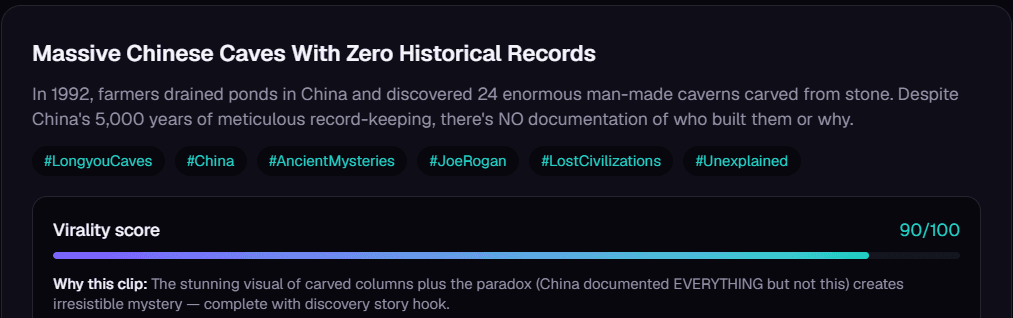
Each candidate comes back with a 0–100 virality score and a plain-English reason it was chosen. Tell it what to look for ("every mention of pricing", "the funniest fail") or which topics to skip.
Finishes and posts them
Clips are cut, captioned in your brand style and reframed to vertical. On the Creator plan and up, it schedules them to YouTube Shorts, TikTok, Instagram, Facebook, X, Threads, LinkedIn and Bluesky.
Why an agent beats a clip generator
You review instead of scrub
The agent does the hours of watching. You spend a few minutes approving the clips with the highest scores and skipping the rest.
It shows its reasoning
Every clip includes the reason it should work, so you can check the AI's judgment instead of trusting a hidden score.
No second or third tool
Captions, reframing, an AI-chat timeline editor (Studio), scheduling and publishing live in the same login. You don't need to export to CapCut or a separate scheduler.
Clip generator vs. AI clipping agent
| Typical clip generator | OptimaClip (clipping agent) | |
|---|---|---|
| Finds moments | Yes | Yes, plus describe-a-moment search |
| Explains each pick | Usually a score only | Score + written reason |
| Captions & vertical reframe | Yes | Yes, with saved brand templates |
| Edit beyond trimming | Often export to another editor | Studio editor driven by chat (Creator+) |
| Schedules & publishes | Often a separate tool or higher tier | 8 platforms built in (Creator+) |
| Automate via API | Often enterprise only | REST API from the Creator plan |
General comparison of the two categories. See our head-to-head pages for specific tools.
Publish everywhere, from the same dashboard
AI clipping agent FAQ
Is an AI clipping agent fully automatic?
It can be, but the best results come from a quick human review. The agent finds, scores and finishes the clips; you spend about twenty minutes choosing which to post or polishing them in Studio.
What videos can the clipping agent work with?
Direct uploads and YouTube links on every plan, plus Twitch and Kick VOD links on the Creator plan and up. Podcasts, streams, webinars, interviews, vlogs, gaming and explainers all work.
How much does OptimaClip cost?
Plans are $19, $39 and $79 a month. One credit equals one minute of source video, and every clip the AI finds is included, with no per-clip fees. A free 3-day trial includes 30 credits.
Can I plug the clipping agent into my own automation?
Yes. The Creator plan and up include a REST API you can call from Zapier, n8n or your own AI agent to start clip jobs programmatically.
Guides: content repurposing
- What Is Content Repurposing? A Plain-English Guide With Examples
- What Is an AI Clipping Agent? How It Differs From a Clip Generator
- Content Repurposing Tools in 2026: What to Use for Each Job
- How comedians turn stand-up sets into short clips that get bookings
- How musicians turn live performances into clips that grow a fan base
- How to turn one video into a blog post and a set of short clips
- OptimaClip vs. Kapwing for repurposing long videos in 2026
- How to repurpose Instagram Live and TikTok LIVE replays into clips
The whole price list
1 credit = 1 minute of video.
Every clip and export is free.
A 10-minute video costs 10 credits — whether the AI finds 3 clips or 15, and however many formats you export. No per-clip fees, no caption fees, no surprise charges. Start with a 3-day free trial: 30 credits, $0 today.
✓ Unlimited AI clips
Every moment the AI finds — free
✓ Every export, free
9:16, 1:1, 16:9, 4:5 — first render of each
✓ Captions included
Animated, 21 languages + auto-detect, brand-styled
✓ Virality score + reasoning
Know why each clip should work
Everything the big tools have — for a fraction of the cost
Clipping, captions, reframing, scheduling and an editor, plus a few things you can't get at OpusClip's price.
AI clip finder with a virality score
Every clip gets a 0–100 score and a one-sentence reason it should work — no black-box guessing.
Animated captions in 21 languages
Brand-styled, single-word pop or classic, custom colors, fonts and positions. Included free on every export.
Curse-word censor
One toggle masks profanity in captions and silences it in the audio — brand-safe clips without an editor.
Find any moment by describing it
Type “the funniest fail” or “every mention of pricing” — search reads the transcript and watches the frames, even in silent video.
Twitch & Kick VOD import
Paste a VOD link and get the highlights. Streamers and clip channels are first-class here.
Highlight Reels
Auto-stitch every matching moment into one compilation clip. No manual stitching.
Studio: edit by chatting
A full timeline editor driven by AI chat — transitions, music, sound effects, text, your own footage, voice-over. Replaces the CapCut round-trip.
Smart Reframe with face tracking
The crop follows the main speaker's face across the clip, so wide video becomes vertical with the person always in frame.
Premiere Pro & DaVinci Resolve export
Download an edit list (EDL) and SRT captions for any clip and open the cut in your editor. Free on every plan.
AI voice-over
Type text, pick a voice, and drop natural narration onto your Studio timeline. 1 credit per voice-over, paid plans.
AI dubbing in 17 languages
Re-voice any finished clip in another language. 10 credits per minute of video, charged only when the dub finishes; paid plans.
Post everywhere, on a schedule
Built-in scheduling to YouTube Shorts, TikTok, Instagram, Facebook, X, Threads, LinkedIn and Bluesky.
Developer API on Creator
Automate clipping from Zapier, n8n or your own code — API access starts at $39/mo, not a custom enterprise quote.
Teams & client workspaces
Seats, roles, brand templates per client. Agency-ready without the enterprise price tag.