Stop making episodes nobody finds.
Turn every episode into clips that grow your show.
You put hours into every episode. OptimaClip reads the whole conversation, pulls out the stories, hot takes, and quotable answers, and turns them into 8-12 captioned vertical clips that send new listeners straight to the full show — without a day of editing.
Upload a file or paste a YouTube link · Pay per source minute, never per clip
Great episodes deserve more than one post
Your best answer is at minute 47.
Nobody new is going to press play on a 90-minute episode to find it. A 45-second clip of that answer is how they find you.
Clipping an episode eats a whole day.
Re-listening, scrubbing, cutting, captioning, reformatting for every platform — for every single episode. That's why most shows only post one or two clips, if any.
Growth happens one clip at a time.
Long-form audiences are increasingly discovered through short-form. Shows that post clips consistently give the feed something to recommend every day.
One episode in. A week of clips out.
Upload the episode
Drop in your video podcast file or paste the YouTube link — the full-length recording, exactly as it came off the mic.
The AI reads the whole conversation
OptimaClip transcribes every word and reasons over the full transcript for stories, strong opinions, disagreements, emotional beats, and clear takeaways — then skips the sponsor reads and intros you tell it to ignore.
Get a week of clips per episode
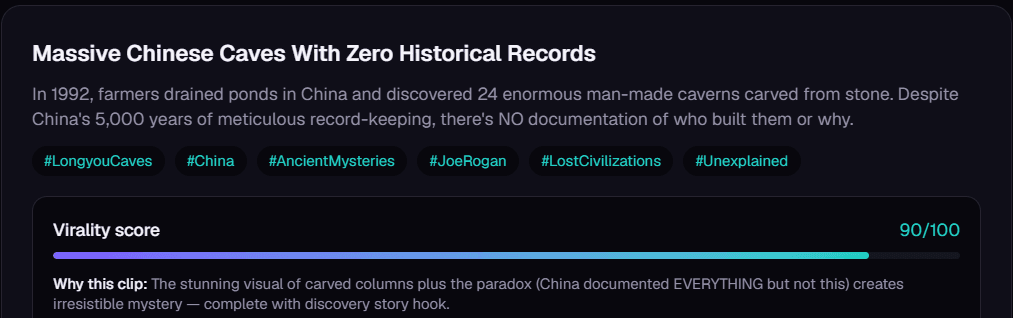
Every moment comes back as a standalone, captioned, vertical clip with a title, hashtags, a virality score, and a plain-English reason it was picked. Schedule them out in one sitting.
Built for conversations, not just footage
Finds the moments, not the noise
The AI reasons over the transcript, not loudness — so it surfaces the quotable answer, the story with a payoff, or the guest's surprising take that makes someone stop scrolling.
Skips the ad reads for you
Tell it once with Exclude Topics — sponsor reads, intros, housekeeping, a subject you'd rather not post — and it stays away from them on every episode.
Keeps the speaker in frame
Smart Reframe finds the speaker's face and follows it as they move, so interviews and multi-person setups look natural in 9:16 instead of a blind center-crop.
Captions people actually read
Word-level highlighted captions on every clip, styled with your show's fonts and colors via a saved Brand Template. Most people scroll with the sound off — your clip still lands.
Grow beyond your language
Transcription in 21 languages plus auto-detect, and AI dubbing to re-voice finished clips in 17 languages so a single episode can reach entirely new audiences.
Clean enough for LinkedIn
One toggle masks profanity in captions and mutes it in the audio — perfect for business, interview, and B2B shows posting where the audience is professional.
What clips from OptimaClip actually do
187 → 1,460
average views per clip
+681% average views in 30 days
1.2% → 3.1%
engagement rate
2.6× more engagements per view
42% → 68%
retention rate
+26 points retention rate in 30 days
“We went from posting clips that barely got seen to having a repeatable way to test stronger hooks and moments from every episode.”
30-day comparison · 16 clips before vs. 24 clips after · YouTube Shorts + TikTok
Every episode, everywhere new listeners scroll
Stop letting your best moments go unheard.
Upload your latest episode and see which moments the AI pulls out — and exactly why it picked each one.
Start free trialPodcaster FAQ
What podcast formats does OptimaClip work with?
Video podcasts — upload the episode file directly or paste a YouTube link. OptimaClip clips video, so you'll want the camera recording rather than an audio-only MP3.
How many clips will I get per episode?
Most episodes produce 8-12 standalone moments, and the AI scales the number of candidates to the episode's length — a 2-hour conversation gets more than a 20-minute one. You pay per source minute, never per clip, so extra clips cost nothing.
Can it skip sponsor reads and intros?
Yes. Add them to Exclude Topics once and the AI won't pick clips from those parts of any episode.
Can my editor fine-tune the clips?
Yes. Every clip can be trimmed and restyled in the clip editor, and every clip also comes with a one-click edit list (EDL) and SRT captions so your editor can open it in Premiere Pro, DaVinci Resolve, or Final Cut. You can also invite teammates with role-based access.
Where can I post the clips?
On the Creator plan and higher, OptimaClip schedules and publishes to YouTube Shorts, TikTok, Instagram Reels, Facebook, X, Threads, LinkedIn, and Bluesky. Manual export works on every plan.
More questions? Read the full FAQ or see every feature.
Guides: podcasters
- Podcast Clip Maker: 8 Things to Look For Before You Pay
- One podcast episode is enough content for a week of shorts
- The best AI clipping tools for podcasters in 2026, beyond just OpusClip
- How to Make a Highlight Reel From Long Footage (Streams, Podcasts, Games and Events)
- How to Become a Clipper for Streamers and Podcasters (and Get Paid)
- Audiograms vs. video clips for podcasts: which works better?
- Podcast guest releases and permissions: what to get before you clip an episode
- How to repurpose an interview podcast into clips
The whole price list
1 credit = 1 minute of video.
Every clip and export is free.
A 10-minute video costs 10 credits — whether the AI finds 3 clips or 15, and however many formats you export. No per-clip fees, no caption fees, no surprise charges. Start with a 3-day free trial: 30 credits, $0 today.
✓ Unlimited AI clips
Every moment the AI finds — free
✓ Every export, free
9:16, 1:1, 16:9, 4:5 — first render of each
✓ Captions included
Animated, 21 languages + auto-detect, brand-styled
✓ Virality score + reasoning
Know why each clip should work
| Plan | Minutes / month | Cost per minute |
|---|---|---|
| OptimaClip Starter$14.25/mo annual · $19 monthly | 300 | $0.048 |
| OptimaClip Creator$29.25/mo annual · $39 monthly | 600 | $0.049 |
| OpusClip Pro (annual)$14.5/mo | 300 | $0.048 |
| OpusClip Starter$15/mo | 150 | $0.100 |
OpusClip figures from its public pricing page, September 2026 (1 credit = 1 minute of source video). Agency: 1,000 credits for $79/mo. Add-on credit packs cost more per minute than plans, so pick the plan that fits. Full OpusClip comparison
Everything the big tools have — for a fraction of the cost
Clipping, captions, reframing, scheduling and an editor, plus a few things you can't get at OpusClip's price.
AI clip finder with a virality score
Every clip gets a 0–100 score and a one-sentence reason it should work — no black-box guessing.
Animated captions in 21 languages
Brand-styled, single-word pop or classic, custom colors, fonts and positions. Included free on every export.
Curse-word censor
One toggle masks profanity in captions and silences it in the audio — brand-safe clips without an editor.
Find any moment by describing it
Type “the funniest fail” or “every mention of pricing” — search reads the transcript and watches the frames, even in silent video.
Twitch & Kick VOD import
Paste a VOD link and get the highlights. Streamers and clip channels are first-class here.
Highlight Reels
Auto-stitch every matching moment into one compilation clip. No manual stitching.
Studio: edit by chatting
A full timeline editor driven by AI chat — transitions, music, sound effects, text, your own footage, voice-over. Replaces the CapCut round-trip.
Smart Reframe with face tracking
The crop follows the main speaker's face across the clip, so wide video becomes vertical with the person always in frame.
Premiere Pro & DaVinci Resolve export
Download an edit list (EDL) and SRT captions for any clip and open the cut in your editor. Free on every plan.
AI voice-over
Type text, pick a voice, and drop natural narration onto your Studio timeline. 1 credit per voice-over, paid plans.
AI dubbing in 17 languages
Re-voice any finished clip in another language. 10 credits per minute of video, charged only when the dub finishes; paid plans.
Post everywhere, on a schedule
Built-in scheduling to YouTube Shorts, TikTok, Instagram, Facebook, X, Threads, LinkedIn and Bluesky.
Developer API on Creator
Automate clipping from Zapier, n8n or your own code — API access starts at $39/mo, not a custom enterprise quote.
Teams & client workspaces
Seats, roles, brand templates per client. Agency-ready without the enterprise price tag.
Renders that don’t get stuck
Automatic failover to a backup renderer and self-healing job recovery — clips finish, or you’re never charged.