
Turn a Kick VOD into a week of clips
Paste the link. The AI watches the whole broadcast, finds what's actually worth clipping, and hands you back captioned, vertical, ready-to-post shorts — real, working Kick VOD import, not a workaround that quietly fails.
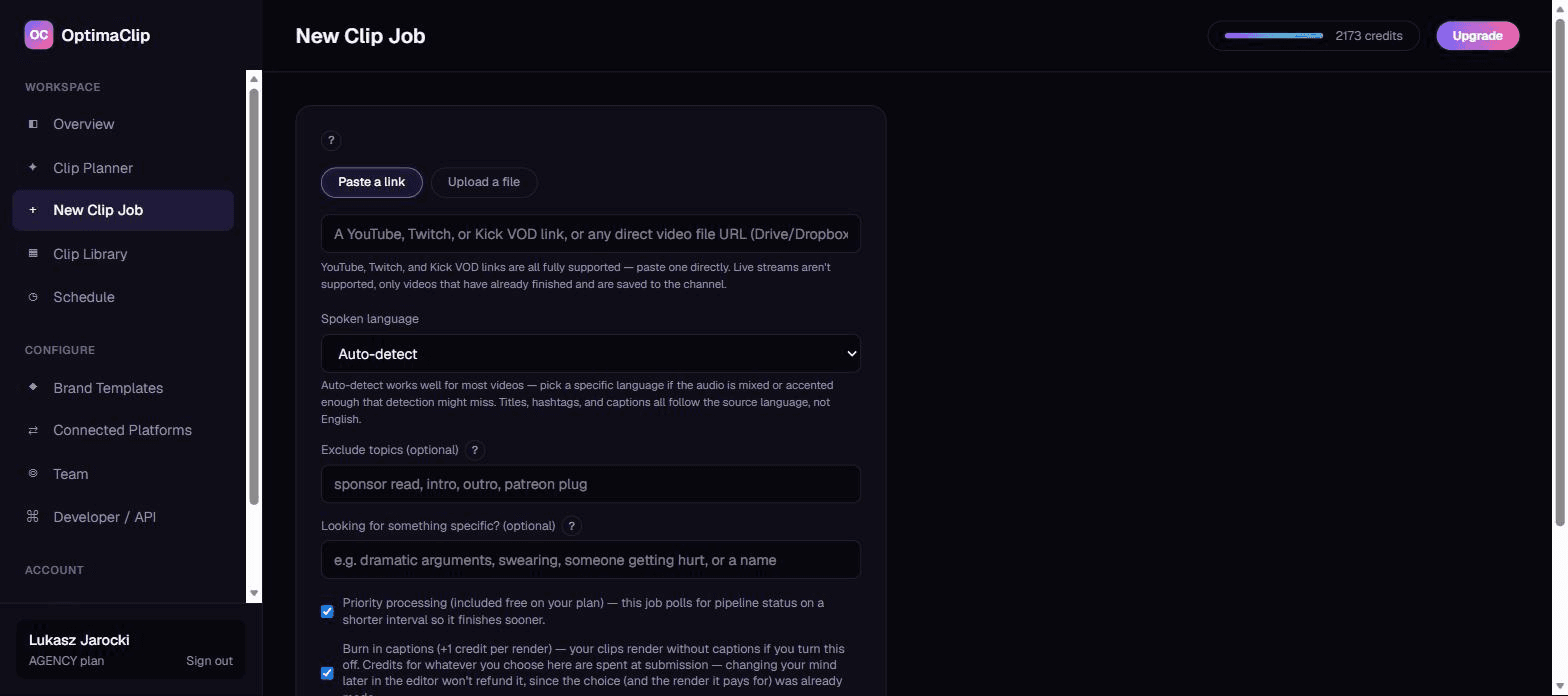
How it works
Paste your Kick VOD link
Grab the link to any finished Kick VOD from your channel. Kick's newer, less standardized video infrastructure has made reliable VOD import a real gap for a lot of clipping tools — OptimaClip pulls it in the same way it does YouTube or Twitch.
The AI watches the whole thing
OptimaClip transcribes the full VOD and reasons over it for hooks, funny reactions, arguments, and teaching moments — not just whatever got the loudest chat spam. Tell it what you're after ("dramatic arguments", "someone getting hurt", a co-streamer's name) and it prioritizes matches.
Vertical clips come out captioned
Every clip is reframed to 9:16, captioned in your chosen font and style, and scored for how likely it is to actually perform — with a plain-English reason why. Export, or schedule straight to TikTok, Shorts, and Reels from the same dashboard.
Built for how streamers actually clip
Dramatic moments and reactions, found for you
The AI moment-search field finds exactly what you're describing — an argument, someone getting hurt, swearing, a specific name — instead of you scrubbing a multi-hour VOD by hand.
Stay in frame while you move
Smart Reframe follows the visual subject through the clip instead of a fixed center-crop — useful for IRL streams or any setup where you're not glued to one spot on screen.
A whole VOD's worth of clips at once
Submit a long stream once and get back a full library of standalone clips, each with its own title, hashtags, and virality score — not one clip at a time.
How to turn a Kick clip into a TikTok, Reel or Short
- Copy the link to the finished Kick VOD (kick.com/<channel>/videos/...). Working from the full VOD lets you pick any moment, not just what someone clipped live.
- Find the moment. Scrub for chat spikes, big reactions or a story with a clear payoff — or paste the link into OptimaClip and describe the moment instead.
- Trim to 20–60 seconds with the hook in the first two seconds. Cut the lead-in; TikTok and Reels viewers decide almost instantly.
- Reframe 16:9 to 9:16 so your face or the action stays in frame, and burn in captions — most viewers watch with the sound off.
- Post natively to TikTok, YouTube Shorts and Instagram Reels with a line that points back to your Kick channel.
OptimaClip handles steps 2–5 from the VOD link. Full guides: how to edit a Kick clip into a TikTok, how to make a Kick highlight, Twitch vs Kick clipping and the gaming clip maker.
Publish everywhere, from the same dashboard
Kick clipping FAQ
How do I edit a Kick clip into a TikTok?
Trim the moment to 20–60 seconds, reframe it from 16:9 to 9:16 vertical, add captions and upload it to TikTok. OptimaClip does all of that from the Kick VOD link: paste it, and it returns captioned vertical clips you can download or schedule to TikTok.
How do I make Kick highlights from a stream?
Wait for the stream to end, then work from the saved VOD. Paste the VOD link into OptimaClip, describe what you want ("funniest moments", "every clutch"), and it finds and scores the highlights — or use Highlight Reels to stitch them into one compilation.
Does Kick VOD import actually work? A lot of tools claim it and don't.
Yes — reliably. Kick changed how VODs are served in 2026 in a way that broke the extraction method most clipping tools rely on, and it's a real, still-open gap for several competitors. OptimaClip pulls VODs in through Kick's own video API directly, not a workaround that only sometimes works.
Does this work with live Kick streams?
No — only VODs that have already finished streaming and are saved to your channel. Submitting a link to a currently-live channel won't work; wait until the broadcast ends.
Do I need to download the VOD myself first?
No. Paste the kick.com/<channel>/videos/... link directly into New Clip Job and OptimaClip pulls the video in as a source automatically.
Which plan do I need?
Kick VOD import is available on the Creator plan and higher. The Starter plan supports direct file uploads and YouTube links.
More questions? Read the full FAQ, or check the Twitch Clip Maker page if that's where you stream instead.
Guides: streamers & gaming
- How to Clip on Twitch (and Turn Those Clips Into TikToks and Shorts)
- Best AI Clipping Tools for Streamers in 2026: What Actually Matters
- Facecam and Gameplay Layouts for Vertical Clips: Stacked, Split and Picture-in-Picture
- How to Auto-Caption Short Clips from a Livestream: Best Tools and Workflows
- How to Edit a Kick Clip Into a TikTok (Step by Step, 2026)
- How to Make a Kick Highlight From a Stream (Clips, Montages and Shorts)
- AI Highlight Reel Generator for Stream VODs: How to Turn Hours of Footage into Viral Clips
- Best Alternatives to OpusClip for Gaming Streamers: Finding the Right AI Clipping Tool
The whole price list
1 credit = 1 minute of video.
Every clip and export is free.
A 10-minute video costs 10 credits — whether the AI finds 3 clips or 15, and however many formats you export. No per-clip fees, no caption fees, no surprise charges. Start with a free 3-day trial: 30 credits, no card needed.
✓ Unlimited AI clips
Every moment the AI finds — free
✓ Every export, free
9:16, 1:1, 16:9, 4:5 — first render of each
✓ Captions included
Animated, 21 languages + auto-detect, brand-styled
✓ Virality score + reasoning
Know why each clip should work
Everything the big tools have — for a fraction of the cost
Clipping, captions, reframing, scheduling and an editor, plus a few things you can't get at OpusClip's price.
AI clip finder with a virality score
Every clip gets a 0–100 score and a one-sentence reason it should work — no black-box guessing.
Animated captions in 21 languages
Brand-styled, single-word pop or classic, custom colors, fonts and positions. Included free on every export.
Curse-word censor
One toggle masks profanity in captions and silences it in the audio — brand-safe clips without an editor.
Find any moment by describing it
Type “the funniest fail” or “every mention of pricing” — search reads the transcript and watches the frames, even in silent video.
Twitch & Kick VOD import
Paste a VOD link and get the highlights. Streamers and clip channels are first-class here.
Highlight Reels
Auto-stitch every matching moment into one compilation clip. No manual stitching.
Studio: edit by chatting
A full timeline editor driven by AI chat — transitions, music, sound effects, text, your own footage, voice-over. Replaces the CapCut round-trip.
Smart Reframe with face tracking
The crop follows the main speaker's face across the clip, so wide video becomes vertical with the person always in frame.
Premiere Pro & DaVinci Resolve export
Download an edit list (EDL) and SRT captions for any clip and open the cut in your editor. Free on every plan.
AI voice-over
Type text, pick a voice, and drop natural narration onto your Studio timeline. 1 credit per voice-over, paid plans.
AI dubbing in 17 languages
Re-voice any finished clip in another language. 10 credits per minute of video, charged only when the dub finishes; paid plans.
Post everywhere, on a schedule
Built-in scheduling to YouTube Shorts, TikTok, Instagram, Facebook, X, Threads, LinkedIn and Bluesky.
Developer API on Creator
Automate clipping from Zapier, n8n or your own code — API access starts at $39/mo, not a custom enterprise quote.
Teams & client workspaces
Seats, roles, brand templates per client. Agency-ready without the enterprise price tag.