You stream. The AI clips.
Your best moments go viral while you sleep.
Every stream has a dozen moments that could blow up on TikTok and Shorts — and they die in your VOD library. OptimaClip watches the whole broadcast, finds the clutch plays, rage moments, and funniest reactions, and turns them into captioned, vertical, ready-to-post clips. No editing. No scrubbing. No excuses.
Works with Twitch, Kick, and YouTube VODs · Pay per source minute, never per clip
Your VODs are a growth engine you're not using
8 hrs
of stream. Zero clips posted.
You went live, you popped off, and then the VOD sat there. Nobody has the energy to rewatch a whole broadcast after streaming it.
0
new viewers from a VOD nobody watches.
Discovery inside Twitch and Kick is brutal. Streamers grow when their best moments keep showing up on TikTok, Shorts, and Reels — every single day.
1
of you. Streaming, editing, and posting.
A good clipper costs real money every month. OptimaClip does the first pass for you — you just approve what you like.
End stream. Submit VOD. Go to bed.
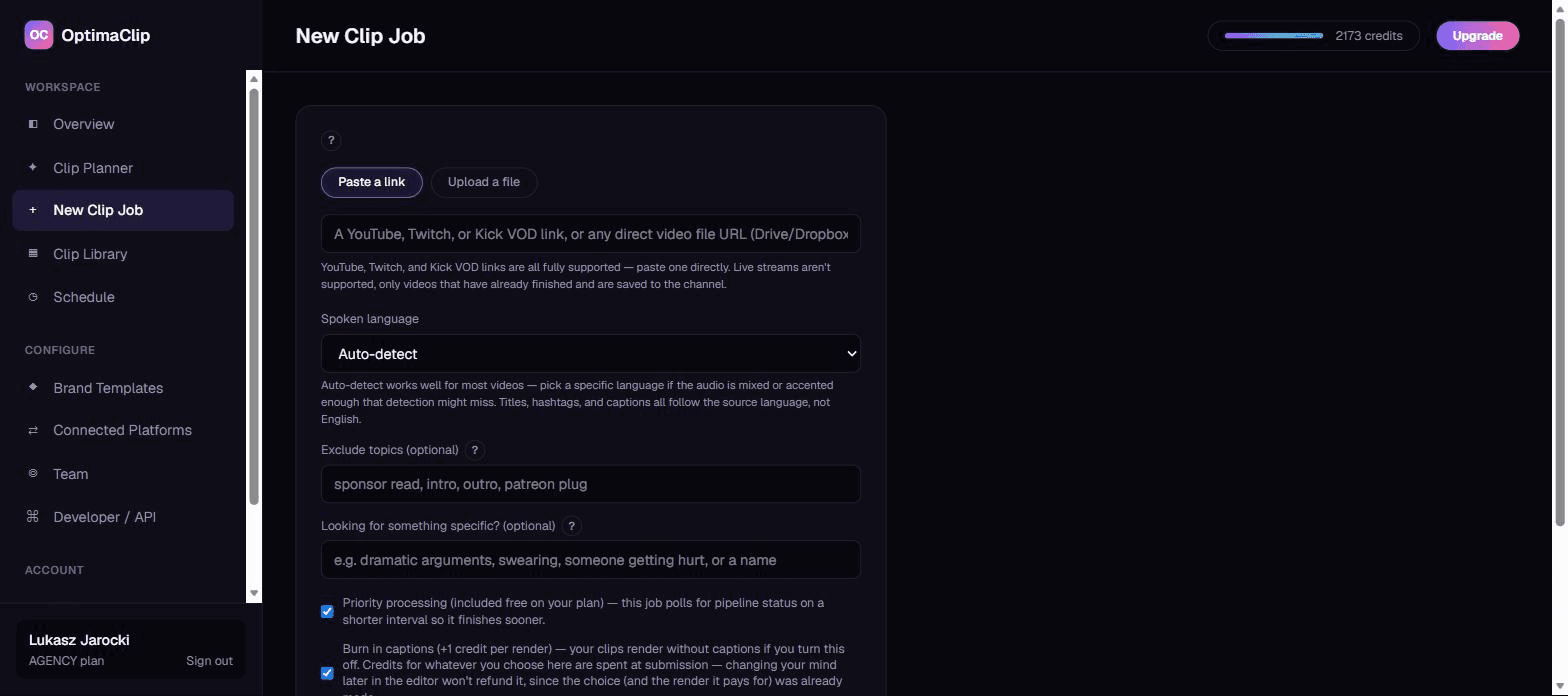
Drop the VOD link
Paste a Twitch, Kick, or YouTube VOD link (or upload the file). No downloading, no exporting from OBS, no dragging hours of footage into an editor.
The AI watches the whole stream
OptimaClip transcribes the full broadcast and reasons over it for clutch plays, rage moments, funny reactions, hot takes, and chat-worthy rants. Tell it what you want — "rage quit", "funny fails", a co-streamer's name — and it hunts for exactly that.
Wake up to a week of content
Every clip comes back vertical, captioned in your style, scored for virality with a plain-English reason why — then scheduled straight to TikTok, Shorts, Reels, and more from the same dashboard.
Built for how streamers actually clip
Moment search that gets gaming
Type what you're after — "a clutch ace", "chat going insane", "someone getting mad" — and the AI prioritizes those moments instead of guessing from volume spikes.
Face tracking that keeps you in frame
Smart Reframe finds your face and follows it as you move, so IRL streams and just-chatting segments stay well-composed in 9:16 instead of a lazy center-crop.
Your look on every clip
Save your fonts, colors, and caption position once as a Brand Template. Every clip from every stream comes out looking like your channel — no restyling by hand.
Keep it monetizable
One toggle masks curse words in captions and silences them in the audio, so the spicy moments stay brand-safe and platform-friendly.
Post every day without thinking about it
Queue a month of clips in one sitting and OptimaClip rotates them across YouTube Shorts, TikTok, Reels, X, and more on the cadence you set.
Hand it to your editor or clipper
Invite a clipper with role-based access, or export any clip to Premiere Pro or DaVinci Resolve with a one-click edit list and SRT captions.
One stream, everywhere your next viewers scroll
The streamers who blow up post every day.
Now you can too — without hiring an editor or losing your weekends. Submit tonight's VOD and see what the AI finds.
Start free trialStreamer FAQ
Which streaming platforms does OptimaClip work with?
Paste a Twitch, Kick, or YouTube VOD link, or upload a recording directly. Twitch and Kick VOD import is on the Creator plan and higher; the Starter plan supports file uploads and YouTube links.
Can it clip while I'm still live?
Not yet — OptimaClip works on finished VODs. Once your broadcast ends and the VOD is saved to your channel, paste the link and the AI takes it from there.
My streams are 6+ hours. Will it handle that?
Yes — long VODs are exactly what it's built for. The AI scales how many clips it looks for to the length of the video, so a long stream gets a proportionally bigger set of candidates. You pay per source minute, never per clip, so a stream costs the same whether it yields 10 clips or 40.
Will it pick the moments I'd actually pick?
Every clip comes with a virality score and a plain-English reason for the pick, and you can steer it by describing the moments you want. Anything you'd tweak — timing, captions, platforms — is one click away in the clip editor.
Can it auto-post my clips?
Yes. On the Creator plan and higher, OptimaClip schedules and publishes to YouTube Shorts, TikTok, Instagram Reels, Facebook, X, Threads, LinkedIn, and Bluesky. Manual export works on every plan.
Platform-specific details on the Twitch Clip Maker and Kick Clip Maker pages, or read the full FAQ.
Guides: streamers & gaming
- How to Clip on Twitch (and Turn Those Clips Into TikToks and Shorts)
- Best AI Clipping Tools for Streamers in 2026: What Actually Matters
- Facecam and Gameplay Layouts for Vertical Clips: Stacked, Split and Picture-in-Picture
- Best Alternatives to OpusClip for Gaming Streamers: Finding the Right AI Clipping Tool
- How to Make a Highlight Reel From Long Footage (Streams, Podcasts, Games and Events)
- How to Become a Clipper for Streamers and Podcasters (and Get Paid)
- Software to Turn Long Streams into Short Highlight Clips: A Practical Guide
- Best AI Clipping Tool for Kick Streamers: What Creators Need to Know
The whole price list
1 credit = 1 minute of video.
Every clip and export is free.
A 10-minute video costs 10 credits — whether the AI finds 3 clips or 15, and however many formats you export. No per-clip fees, no caption fees, no surprise charges. Start with a 3-day free trial: 30 credits, $0 today.
✓ Unlimited AI clips
Every moment the AI finds — free
✓ Every export, free
9:16, 1:1, 16:9, 4:5 — first render of each
✓ Captions included
Animated, 21 languages + auto-detect, brand-styled
✓ Virality score + reasoning
Know why each clip should work
| Plan | Minutes / month | Cost per minute |
|---|---|---|
| OptimaClip Starter$14.25/mo annual · $19 monthly | 300 | $0.048 |
| OptimaClip Creator$29.25/mo annual · $39 monthly | 600 | $0.049 |
| OpusClip Pro (annual)$14.5/mo | 300 | $0.048 |
| OpusClip Starter$15/mo | 150 | $0.100 |
OpusClip figures from its public pricing page, September 2026 (1 credit = 1 minute of source video). Agency: 1,000 credits for $79/mo. Add-on credit packs cost more per minute than plans, so pick the plan that fits. Full OpusClip comparison
Everything the big tools have — for a fraction of the cost
Clipping, captions, reframing, scheduling and an editor, plus a few things you can't get at OpusClip's price.
AI clip finder with a virality score
Every clip gets a 0–100 score and a one-sentence reason it should work — no black-box guessing.
Animated captions in 21 languages
Brand-styled, single-word pop or classic, custom colors, fonts and positions. Included free on every export.
Curse-word censor
One toggle masks profanity in captions and silences it in the audio — brand-safe clips without an editor.
Find any moment by describing it
Type “the funniest fail” or “every mention of pricing” — search reads the transcript and watches the frames, even in silent video.
Twitch & Kick VOD import
Paste a VOD link and get the highlights. Streamers and clip channels are first-class here.
Highlight Reels
Auto-stitch every matching moment into one compilation clip. No manual stitching.
Studio: edit by chatting
A full timeline editor driven by AI chat — transitions, music, sound effects, text, your own footage, voice-over. Replaces the CapCut round-trip.
Smart Reframe with face tracking
The crop follows the main speaker's face across the clip, so wide video becomes vertical with the person always in frame.
Premiere Pro & DaVinci Resolve export
Download an edit list (EDL) and SRT captions for any clip and open the cut in your editor. Free on every plan.
AI voice-over
Type text, pick a voice, and drop natural narration onto your Studio timeline. 1 credit per voice-over, paid plans.
AI dubbing in 17 languages
Re-voice any finished clip in another language. 10 credits per minute of video, charged only when the dub finishes; paid plans.
Post everywhere, on a schedule
Built-in scheduling to YouTube Shorts, TikTok, Instagram, Facebook, X, Threads, LinkedIn and Bluesky.
Developer API on Creator
Automate clipping from Zapier, n8n or your own code — API access starts at $39/mo, not a custom enterprise quote.
Teams & client workspaces
Seats, roles, brand templates per client. Agency-ready without the enterprise price tag.
Renders that don’t get stuck
Automatic failover to a backup renderer and self-healing job recovery — clips finish, or you’re never charged.